On this page
lpstation Docs
One workspace for concentrated liquidity. Compare pools across DEXs and chains, add liquidity in a single transaction, and keep every position earning, without handing your funds to anyone.
Not a vault. Your wallet. lpstation is a UX layer and a router. Your positions and funds stay in your own wallet from start to finish.
Strongly backed by Kyo Finance and KYO.ag
- Kyo Finance has spent more than four years building DEX and liquidity infrastructure.
- KYO.ag is integrated with Jumper and Bungee. It runs meta DEX aggregation across 18 chains and intent-based cross-chain swaps on 7, and is the main intent bridge for several of them.
Networks and DEXs















| Network | DEXs |
|---|---|
| Robinhood | Uniswap v3, Uniswap v4, UP, Kittenswap, Ramses |
| Arc | Uniswap v3, Uniswap v4, Aerodrome |
| Base | Uniswap v3, Aerodrome |
| HyperEVM | HyperSwap, Project X, Kittenswap, Ramses, nest, Hybra, UltraSolid |
| BNB Chain | PancakeSwap v3, PancakeSwap Infinity |
| Avalanche | Pharaoh, Uniswap v3 |
| OP Mainnet | Velodrome, Uniswap v3 |
Getting started
- Connect your wallet. Any browser wallet that connects to web apps works, such as MetaMask or Rabby.
- Pick a network from the top bar.
- Choose a pool in Add position, set your range and amount, then select Get quote.
- Review and sign. Every step is listed before your wallet asks you for anything.

Rewards, counted the way each DEX pays
A pool's APR only matters if it is what you can actually earn. DEXs reward liquidity in very different ways, so lpstation reads each one on its own terms.
- Swap fees
- Most pools pay liquidity providers a share of every trade while the price is inside their range. Some pass the swap fee to voters instead. There lpstation shows 0% fees, so you never count on income that is not coming.
- Emissions instead of fees
- On many DEXs, staking a position earns token emissions but gives up its swap fees. You earn one or the other, never both, so lpstation never adds them together.
- Rewards on top of fees
- Some farms keep paying your swap fees while you are staked, and incentive campaigns can pay on top without any staking. Here both count.
- Rewards settled off-chain
- Some DEXs settle emissions off-chain and let you claim a signed amount. lpstation includes them and claims them for you.
What this means for you:
- nAPR, our normalized APR, shows what liquidity in a range earns while the price stays inside it, counted the way that DEX pays.
- Where staking changes what you earn, Earn shows both options with their nAPR and picks the higher one for you.
- In Manage, each position's nAPR follows how it actually sits: staked or not.
- Everything a position has earned can be claimed from one place.
Using lpstation
Add liquidity
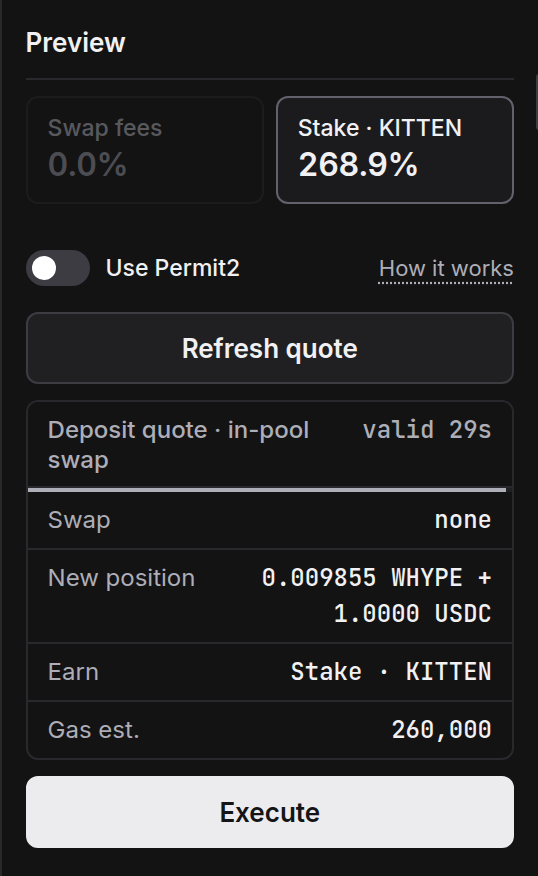
- Find a pool. Pools across the network's DEXs, compared by nAPR, volume and TVL. Tokens are matched by address, so look-alike tokens stay out of the list.
- Choose a range. Presets sized to how much the pair moves, a recommended range, a live liquidity ladder, and a backtest of how the range would have done recently.
- Deposit what you have. One token, both, or a token the pool does not hold. It is converted in the same transaction.
- Choose how it earns. In pools that pay for staking, pick Swap fees or Stake.
- Get quote, then Execute. The quote shows any swap, the exact position you will receive, and the estimated gas.
Manage positions
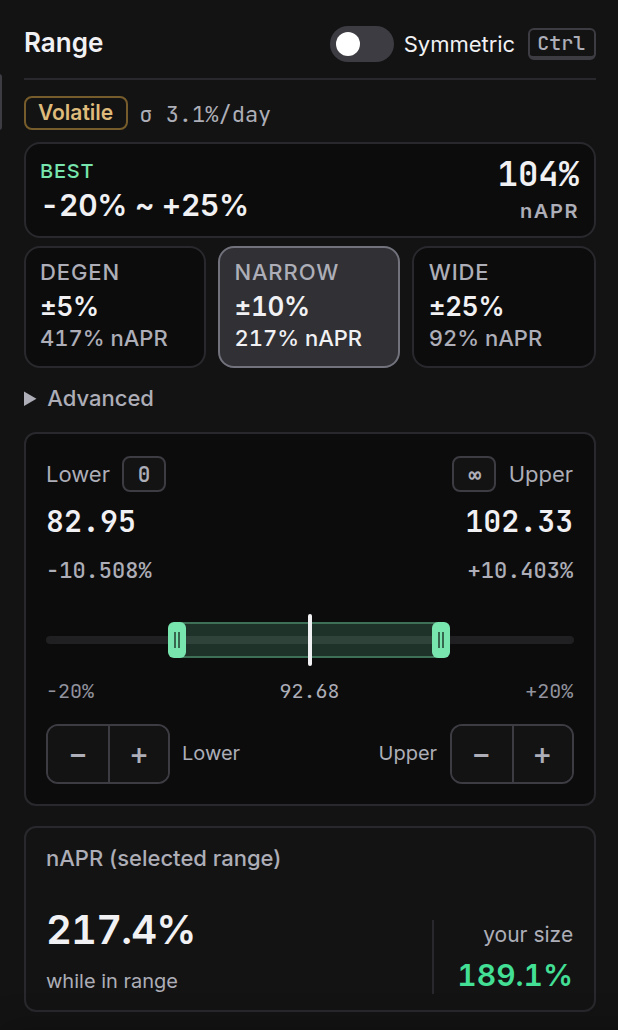
- All your positions on the selected network, from every supported DEX, in one list. Filter by in range, near an edge or out of range, and sort by date, value or nAPR.
- Each position shows its range status, a Staked or Unstaked label where staking matters, its unclaimed fees and its own nAPR.
- Claim collects fees and rewards together, grouped into as few transactions as possible.
- Remove withdraws all or part of a position.
Rebalance and move
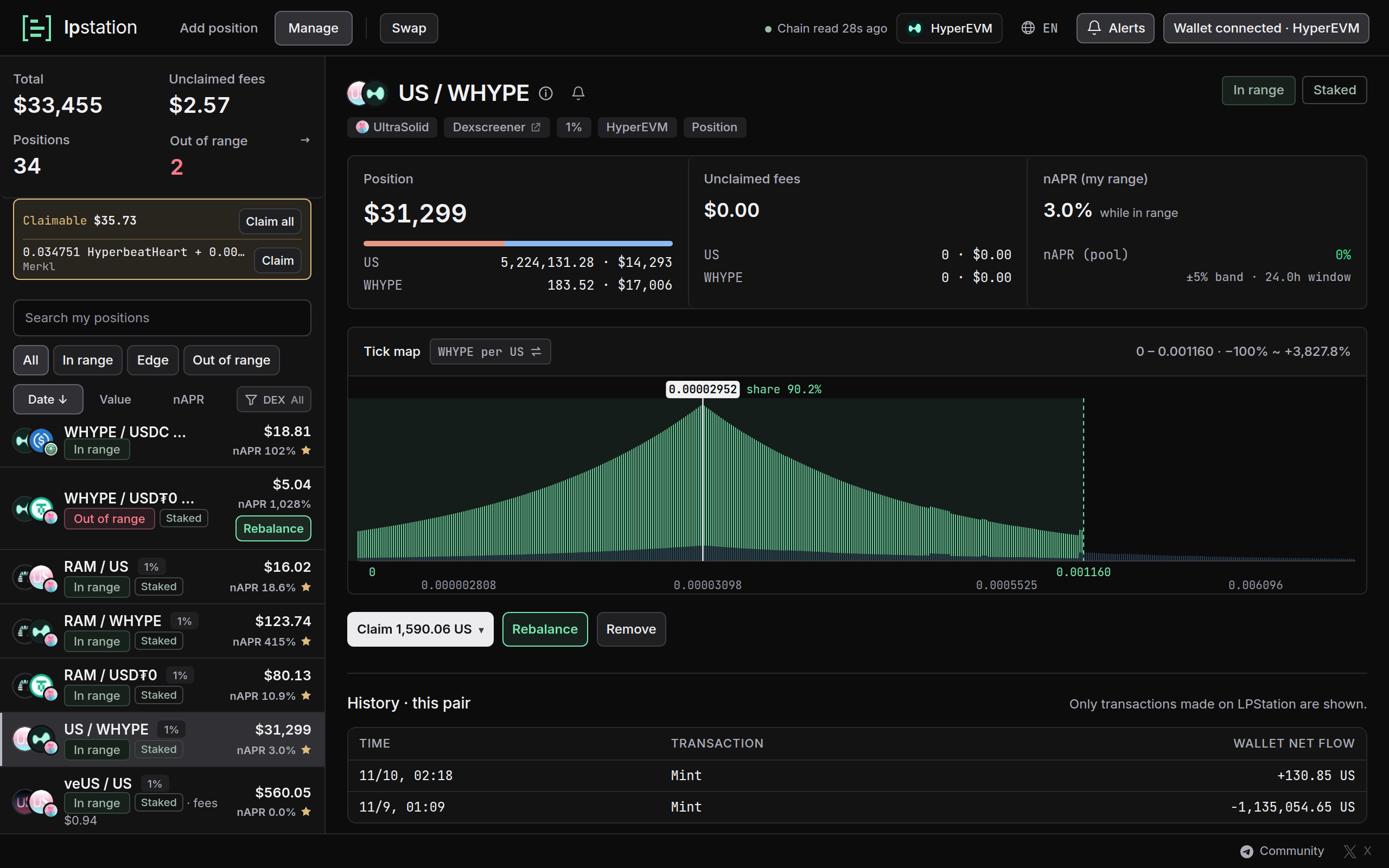
- When the price leaves your range or nears its edge, Rebalance moves the position to a new range in one transaction: it withdraws, swaps to the right ratio and adds the liquidity again.
- Pick a preset or set the bounds yourself, and see the new range's nAPR and a backtest before you commit.
- Options: reinvest unclaimed fees, top up from your wallet, and keep the new position staked.
- To move a position to another pool of the same pair, such as a different fee tier or DEX, choose it under My position in Add position.

Staking
- Some pools pay their emissions only to staked positions. When you choose to stake, lpstation adds the staking steps right after the new position is created.
- Only a position's owner can stake it, and the position is created straight in your wallet, so staking takes one or two more signatures. They are listed before you start.
- Staked positions carry a Staked label in Manage. Their rewards are claimed with the rest, and a rebalance can put the new position straight back in.
Alerts
Connect Telegram to get a message when a position leaves its range, nears an edge, or reaches a price you set. Alerts only read: they never move funds.
Swap
A built-in swap powered by KYO.ag, for same-chain and cross-chain swaps. After you claim a reward, Swap opens with that token ready.
Past positions
Positions you have closed stay listed, with a timeline of what you did through lpstation: added, rebalanced, collected and removed. It is a record of your transactions, not a performance report.
Safety
- Your wallet, not a vault
- lpstation never holds your funds. Each action is a transaction from your own wallet and finishes inside that transaction. Nothing is parked with us in between.
- Minimal approvals
- By default you approve only the one position an action uses, never every position you own, and only the exact token amount a deposit needs.
Approvals only you can use
Most wallet drains start with an old approval: a contract you approved once is later tricked into moving your tokens. lpstation splits its work between two contracts, so an approval to lpstation cannot be turned against you.
The new position goes to your wallet. The Hub checks it arrived, or the whole transaction reverts.
- The Hub is the only lpstation contract you approve. It is deliberately small: it trades nothing, and it moves tokens and positions only from the wallet that sent the transaction. Only you can set it in motion, and only in a transaction you send.
- The Executor does the work: swaps, deposits and staking on the DEXs. No one ever approves it. The Hub hands it exactly what your transaction needs, during that transaction only.
- When the Executor is done, the Hub checks that the new position is in your wallet and at least as large as you accepted. If not, the whole transaction reverts.
So an approval to the Hub is useless to anyone but you, and the contract that works with the DEXs never has access to your wallet. It is the same principle as 0x's AllowanceHolder.
Use Permit2. We recommend it.
Permit2 goes one step further: you do not approve even the Hub. You approve Uniswap's Permit2, a contract used across DeFi, once per token. After that, each deposit is a signature instead of an approval. Turn on Use Permit2 in the Preview.
- No allowance to lpstation at all, not even to the Hub. Nothing is left standing, so there is nothing to revoke.
- The signature covers the exact amount, works once and expires within minutes.
- It only works in your own transaction. No one else can use it.
- Signing costs no gas, so every deposit after the first skips an approval transaction.
- Protected execution
- Every quote sets a slippage limit and a deadline, and the smallest position you will accept is fixed before you sign. If the market moves past your limits, the transaction simply fails and your funds stay where they were.
- The better route
- Each quote compares routes and executes through the better one.
- Unsafe tokens and pools filtered
- Tokens are recognized by address, never by name. Tokens that lose part of every transfer are refused when quoting, and pools with unverified hooks are hidden.
- Every step shown first
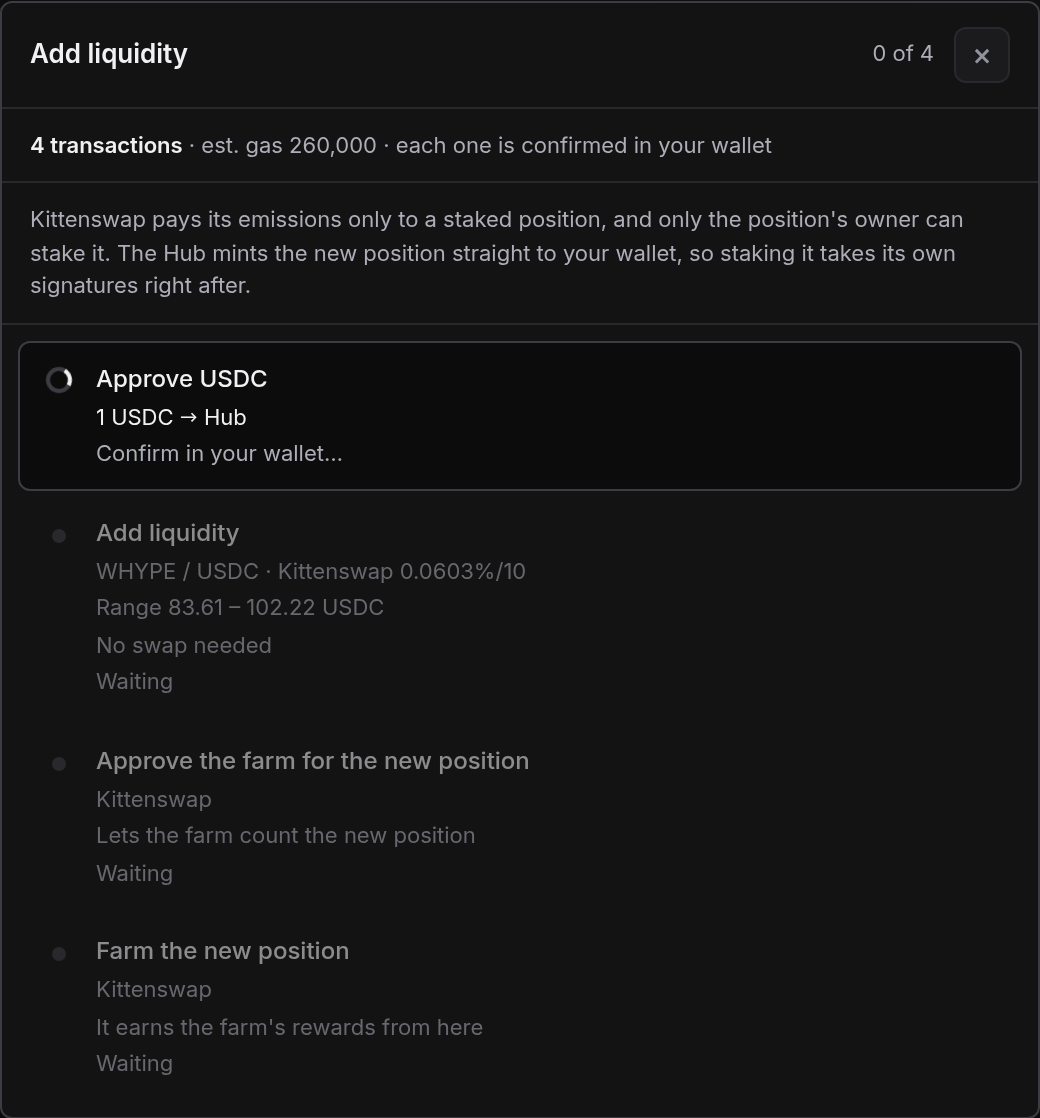
- Before your wallet asks for anything, you see how many signatures an action takes, what each one does, and why any are separate.
This is what you see before your wallet opens. Adding liquidity to a Kittenswap pool with staking chosen takes four steps: the token approval, the deposit itself, and the two staking steps, each with what it does and the reason staking is signed separately. With Permit2 on, the approval becomes a free signature and there is no allowance left behind.
Contract addresses
When your wallet asks you to approve or send a transaction, check that it goes to the lpstation Hub for that network.
| Network | Hub |
|---|---|
| Robinhood | |
| Arc | |
| Base | 0xc2d1e4678b894b78548e1f8335cd8df4038d4034Basescan ↗ |
| HyperEVM | 0xd5383f2eeca0abf4893b9e8be84865a1f178f1d7HyperEVMScan ↗ |
| BNB Chain | 0x14b5099aafdc511eb5f3747497bb5fe70c64d0f3BscScan ↗ |
| Avalanche | 0x14b5099aafdc511eb5f3747497bb5fe70c64d0f3Snowscan ↗ |
| OP Mainnet | 0x14b5099aafdc511eb5f3747497bb5fe70c64d0f3OP Etherscan ↗ |
Fees
lpstation currently charges no fee. When a deposit or rebalance needs a swap, the aggregator route may include a minimal swap fee. Network gas is paid as usual.
Risks
lpstation's contracts are provided as is and, like any smart contract, carry risk. They are designed to keep it small:
- The Hub acts only on a transaction you send, and the Executor that works with the DEXs is never approved (see Approvals only you can use).
- Every transaction checks its own result. If the new position does not arrive in your wallet, or the amounts fall outside your slippage limit, the whole transaction reverts.
Providing liquidity has its own risks. Price moves can leave a position worth less than simply holding the tokens (impermanent loss). A position out of range earns nothing until the price comes back. Reward tokens change in price. lpstation also depends on the DEXs it connects to. Nothing here is financial advice.
FAQ
Does lpstation hold my funds?
No. lpstation is not a vault. Your positions and tokens stay in your wallet the whole time.
Why do some actions need more than one signature?
A token approval, a Permit2 signature, or staking a new position can each be a step of its own. They are listed before you start, each with its reason.
How do I revoke an approval?
From your wallet's connected-sites or permissions settings, or with a tool such as Revoke.cash. With Permit2 there is no allowance to lpstation to revoke.
What is nAPR?
Normalized APR: what liquidity in a given range earns per year while the price stays inside it, from recent fees and rewards, counted the way each DEX actually pays. It lets pools compare on equal terms. It is an estimate from recent activity, not a promise.
What happens when my position goes out of range?
It stops earning swap fees and holds only one of the two tokens until the price comes back. Rebalance moves it to a range around the current price.
Do I have to stake?
No. Where staking changes what you earn, lpstation shows both options and preselects the higher one. The choice is yours.
Which wallets work?
Any browser wallet that connects to web apps, such as MetaMask or Rabby.
Glossary
- Range
- The price interval where your liquidity is active.
- In range, out of range
- Whether the current price is inside your range. Only liquidity in range earns swap fees.
- nAPR
- Normalized APR. See the FAQ above.
- Hub
- The lpstation contract you approve and send transactions to on each network. It moves tokens only from the wallet that sends the transaction.
- Executor
- The lpstation contract that swaps, deposits and stakes on the DEXs within your transaction. No one approves it.
- Rebalance
- Moving a position to a new range in one transaction.
- Staking
- Putting a position where its pool pays emissions to it.
- Claim
- Collecting the fees and rewards a position has earned.
- Slippage
- How far the price may move between the quote and the transaction before it is refused.
- Permit2
- A widely used approval standard: one approval to Permit2, then a single-use signature for each deposit.
Screenshots show the app with wallet addresses and position IDs removed. Figures in them are examples from the time of capture, not live values.